---
title: Quick Guide to Enabling an Email Notification in TeamKeeper
description: This article serves as a quick reference to enabling email notifications inside of TeamKeeper.
---
[Skip to content](https://knowledge.teamkeeper.com/enabling-an-email-notification-in-teamkeeper#main-content)
English
Show submenu for translations
/teamkeepr_logo.png?width=191&height=45&name=teamkeepr_logo.png)
Open main navigation
Close main navigation
- English
Show submenu for translations
- Contact us
Contact us
How can we help you?
- There are no suggestions because the search field is empty.
1. [Help Center](https://knowledge.teamkeeper.com/?hsLang=en)
2. [Notifications](https://knowledge.teamkeeper.com/notifications?hsLang=en)
# Quick Guide to Enabling an Email Notification in TeamKeeper
## This article serves as a quick reference to enabling email notifications inside of TeamKeeper.
All notifications in TeamKeeper can be enabled from the Notification Configuration page found by going to Administrator \> Notifications.
The column on the left hand side lists all of the notifications that can be enabled in TeamKeeper. A checkmark to the left of the notification name signifies a notification that is enabled for you site. There is no limit to the number of notifications you can have enabled at one time.
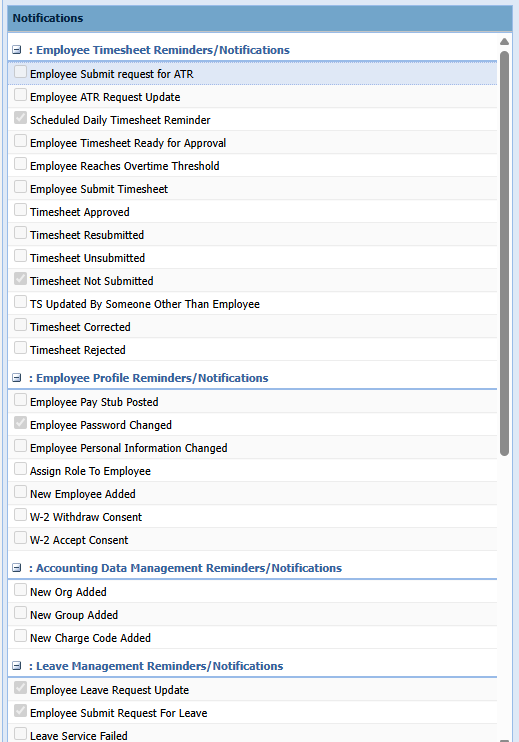
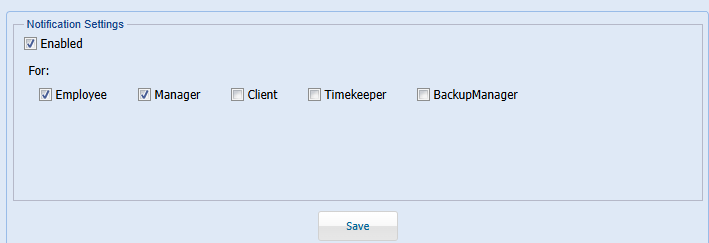
Click on the name of any notification to bring up its settings menu. To enable a notification, mark the 'Enabled' checkbox and and the checkboxes of whatever role(s) you would like to get the notification.
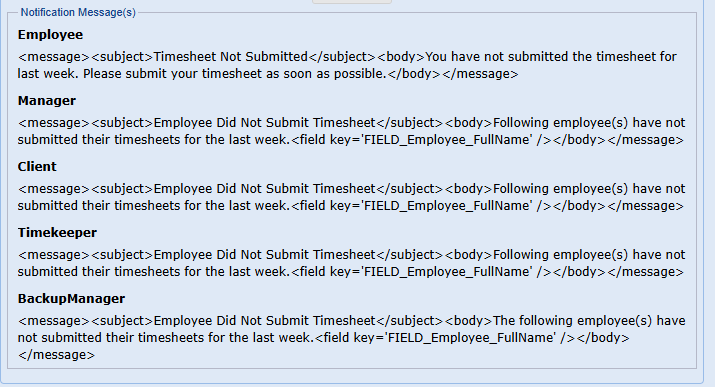
A copy of the email each role will get for this notification type is listed below the Notification Settings box.
- [Business Rule Management](https://knowledge.teamkeeper.com/business-rule-management?hsLang=en)
- [CLOCKS - ATS](https://knowledge.teamkeeper.com/clocks-ats?hsLang=en)
- [Configuration](https://knowledge.teamkeeper.com/configuration?hsLang=en)
- [Customer Sites](https://knowledge.teamkeeper.com/customer-sites?hsLang=en)
- [DCAA Compliance](https://knowledge.teamkeeper.com/dcaa-compliance?hsLang=en)
- [Employee Management](https://knowledge.teamkeeper.com/employee-management?hsLang=en)
- [Genus Clocks](https://knowledge.teamkeeper.com/genus-clocks?hsLang=en)
- [GMS Notes](https://knowledge.teamkeeper.com/gms-notes?hsLang=en)
- [Guides and Pieces](https://knowledge.teamkeeper.com/guides-and-pieces?hsLang=en)
- [Help Guides](https://knowledge.teamkeeper.com/help-guides?hsLang=en)
- [Imports Exports](https://knowledge.teamkeeper.com/imports-exports?hsLang=en)
- [Leave](https://knowledge.teamkeeper.com/leave?hsLang=en)
- [Login](https://knowledge.teamkeeper.com/login?hsLang=en)
- [MFA - Multi Factor Authentication](https://knowledge.teamkeeper.com/mfa-multi-factor-authentication?hsLang=en)
- [Mobile App](https://knowledge.teamkeeper.com/mobile-app?hsLang=en#main-content)
- [Android](https://knowledge.teamkeeper.com/mobile-app?hsLang=en#android)
- [Notifications](https://knowledge.teamkeeper.com/notifications?hsLang=en)
- [Prepopulation](https://knowledge.teamkeeper.com/prepopulation?hsLang=en)
- [QuickBooks Knowledge](https://knowledge.teamkeeper.com/quickbooks-knowledge?hsLang=en)
- [QuickBooks](https://knowledge.teamkeeper.com/quickbooks?hsLang=en)
- [Questions / Inquiries](https://knowledge.teamkeeper.com/questions-inquiries?hsLang=en)
- [Reports](https://knowledge.teamkeeper.com/reports?hsLang=en)
- [Task Management](https://knowledge.teamkeeper.com/task-management?hsLang=en)
- [TeamKeeper Components](https://knowledge.teamkeeper.com/teamkeeper-components?hsLang=en)
- [TeamKeeper End User](https://knowledge.teamkeeper.com/teamkeeper-end-user?hsLang=en#main-content)
- [W2](https://knowledge.teamkeeper.com/teamkeeper-end-user?hsLang=en#w2)
- [Training Employee Guides](https://knowledge.teamkeeper.com/training-employee-guides?hsLang=en)
- [User Guides](https://knowledge.teamkeeper.com/user-guides?hsLang=en)
- [W2 Forms](https://knowledge.teamkeeper.com/w2-forms?hsLang=en)
- [Timesheet Data Backup Options](https://knowledge.teamkeeper.com/timesheet-data-backup-options?hsLang=en)
- [Version Release Notes](https://knowledge.teamkeeper.com/version-release-notes?hsLang=en)
# TeamKeeper
[mailto:email@email.com](mailto:email@email.com)
Copyright © 2026, TeamKeeper