---
title: How to Start a Chat with TeamKeeper Support
description: How to start a support chat
---
[Skip to content](https://knowledge.teamkeeper.com/how-to-start-a-chat-with-teamkeeper-support#main-content)
English
Show submenu for translations
/teamkeepr_logo.png?width=191&height=45&name=teamkeepr_logo.png)
Open main navigation
Close main navigation
- English
Show submenu for translations
- Contact us
Contact us
How can we help you?
- There are no suggestions because the search field is empty.
1. [Help Center](https://knowledge.teamkeeper.com/?hsLang=en)
2. [TeamKeeper End User](https://knowledge.teamkeeper.com/teamkeeper-end-user?hsLang=en)
# How to Start a Chat with TeamKeeper Support
## This article describes the two ways that you can reach out to TeamKeeper support via chat.
If you want to contact TeamKeeper support through chat, or need to share your screen and share sensitive files then you have two options.
1\. Go to **remote.teamkeeper.com** and click on the name of the support representative you would like to speak with. Follow the on screen instructions to begin the session.
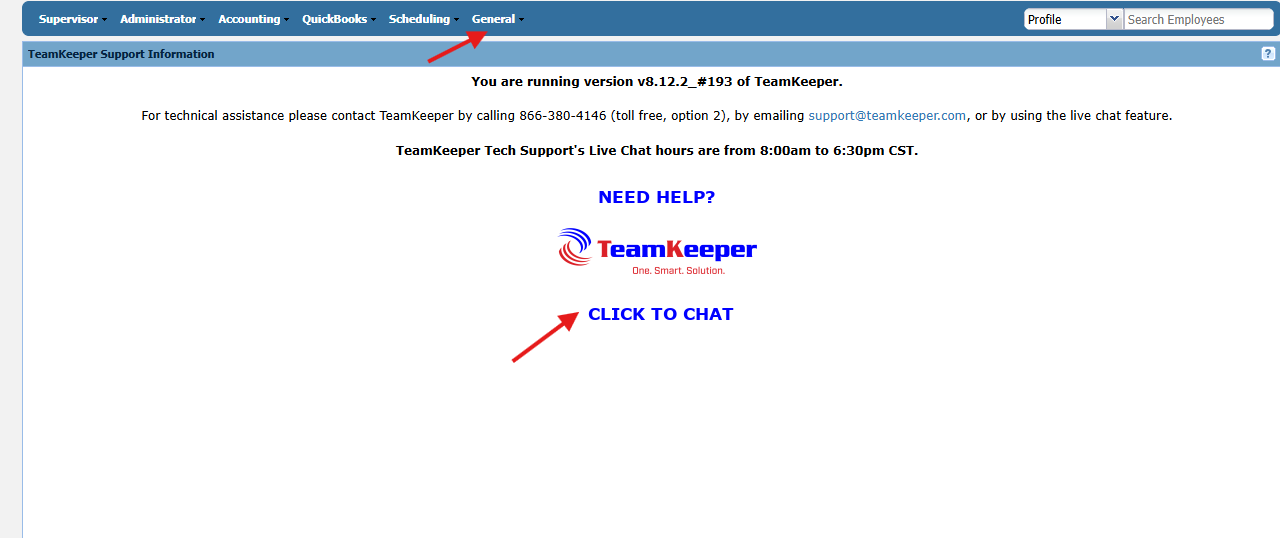
2\. When logged into your TeamKeeper site, go to the General tab and select Help Desk. Once there you can press "Click to Chat" and follow the on screen instructions to begin the session.
- [Business Rule Management](https://knowledge.teamkeeper.com/business-rule-management?hsLang=en)
- [CLOCKS - ATS](https://knowledge.teamkeeper.com/clocks-ats?hsLang=en)
- [Configuration](https://knowledge.teamkeeper.com/configuration?hsLang=en)
- [Customer Sites](https://knowledge.teamkeeper.com/customer-sites?hsLang=en)
- [DCAA Compliance](https://knowledge.teamkeeper.com/dcaa-compliance?hsLang=en)
- [Employee Management](https://knowledge.teamkeeper.com/employee-management?hsLang=en)
- [Genus Clocks](https://knowledge.teamkeeper.com/genus-clocks?hsLang=en)
- [GMS Notes](https://knowledge.teamkeeper.com/gms-notes?hsLang=en)
- [Guides and Pieces](https://knowledge.teamkeeper.com/guides-and-pieces?hsLang=en)
- [Help Guides](https://knowledge.teamkeeper.com/help-guides?hsLang=en)
- [Imports Exports](https://knowledge.teamkeeper.com/imports-exports?hsLang=en)
- [Leave](https://knowledge.teamkeeper.com/leave?hsLang=en)
- [Login](https://knowledge.teamkeeper.com/login?hsLang=en)
- [MFA - Multi Factor Authentication](https://knowledge.teamkeeper.com/mfa-multi-factor-authentication?hsLang=en)
- [Mobile App](https://knowledge.teamkeeper.com/mobile-app?hsLang=en#main-content)
- [Android](https://knowledge.teamkeeper.com/mobile-app?hsLang=en#android)
- [Notifications](https://knowledge.teamkeeper.com/notifications?hsLang=en)
- [Prepopulation](https://knowledge.teamkeeper.com/prepopulation?hsLang=en)
- [QuickBooks Knowledge](https://knowledge.teamkeeper.com/quickbooks-knowledge?hsLang=en)
- [QuickBooks](https://knowledge.teamkeeper.com/quickbooks?hsLang=en)
- [Questions / Inquiries](https://knowledge.teamkeeper.com/questions-inquiries?hsLang=en)
- [Reports](https://knowledge.teamkeeper.com/reports?hsLang=en)
- [Task Management](https://knowledge.teamkeeper.com/task-management?hsLang=en)
- [TeamKeeper Components](https://knowledge.teamkeeper.com/teamkeeper-components?hsLang=en)
- [TeamKeeper End User](https://knowledge.teamkeeper.com/teamkeeper-end-user?hsLang=en#main-content)
- [W2](https://knowledge.teamkeeper.com/teamkeeper-end-user?hsLang=en#w2)
- [Training Employee Guides](https://knowledge.teamkeeper.com/training-employee-guides?hsLang=en)
- [User Guides](https://knowledge.teamkeeper.com/user-guides?hsLang=en)
- [W2 Forms](https://knowledge.teamkeeper.com/w2-forms?hsLang=en)
- [Timesheet Data Backup Options](https://knowledge.teamkeeper.com/timesheet-data-backup-options?hsLang=en)
- [Version Release Notes](https://knowledge.teamkeeper.com/version-release-notes?hsLang=en)
# TeamKeeper
[mailto:email@email.com](mailto:email@email.com)
Copyright © 2026, TeamKeeper