---
title: Punch Rounding (Round In&Out Example Settings)
description: "There are 3 settings that are available to choose from for the Round In/Out setting in the sites Advanced Configuration page: Punch, Pair and Day Depending on the setting that is chosen along with t"
---
[Skip to content](https://knowledge.teamkeeper.com/kb/article/387#main-content)
English
Show submenu for translations
/teamkeepr_logo.png?width=191&height=45&name=teamkeepr_logo.png)
Open main navigation
Close main navigation
- English
Show submenu for translations
- Contact us
Contact us
How can we help you?
- There are no suggestions because the search field is empty.
1. [Help Center](https://knowledge.teamkeeper.com/?hsLang=en)
2. [Configuration](https://knowledge.teamkeeper.com/configuration?hsLang=en)
# Punch Rounding (Round In&Out Example Settings)
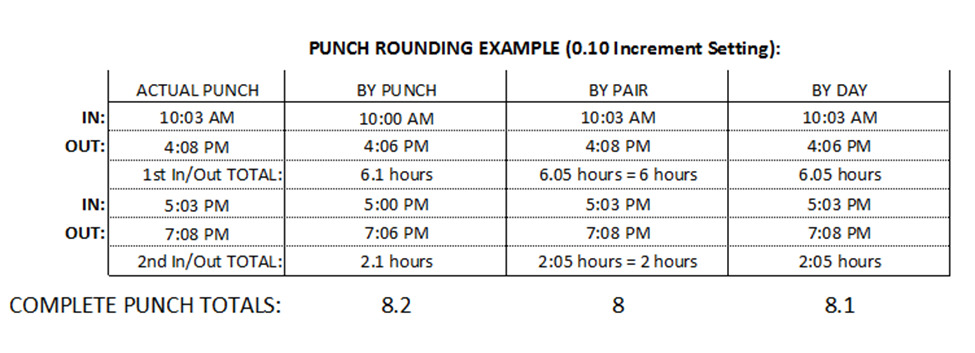
There are 3 settings that are available to choose from for the Round In/Out setting in the sites Advanced Configuration page: Punch, Pair and Day
Depending on the setting that is chosen along with the actual punch times, the daily total can vary. Also keep in mind that the hours increment setting will have a big effect on the rounding. The higher the setting, the greater the variance will be in the rounding. The Hours Entered in Increments setting are: 0.01, 0.10, 0.25, 0.50 and 1.0. Below is a chart with an example of punch rounding with a .10 hourly increment setting.
If the Punch Rounding Increment is changed in the middle of a pay period it will effect all current and past punches *in the current pay period*, once the timesheets are saved. This could have an effect on the total hours worked by increasing or decreasing the amount. Because of this it is recommended that this setting is changed at the beginning of the pay period. Also suggest to the customer that they may want to inform their employees of the upcoming changes to the timesheet.
If a Charge Code is required on Web Clock In punches, then the only Round In/Out by option that can be used is by Punch or Pair. Day cannot be used because it will not allow for multiple charges on a single day. Also the Use\_Schedule\_In\_Out must be set to False in Advanced Configuration and the charge\_code\_required\_on\_webclock\_in value must be set to True. See Below:


"
- [Business Rule Management](https://knowledge.teamkeeper.com/business-rule-management?hsLang=en)
- [CLOCKS - ATS](https://knowledge.teamkeeper.com/clocks-ats?hsLang=en)
- [Configuration](https://knowledge.teamkeeper.com/configuration?hsLang=en)
- [Customer Sites](https://knowledge.teamkeeper.com/customer-sites?hsLang=en)
- [DCAA Compliance](https://knowledge.teamkeeper.com/dcaa-compliance?hsLang=en)
- [Employee Management](https://knowledge.teamkeeper.com/employee-management?hsLang=en)
- [Genus Clocks](https://knowledge.teamkeeper.com/genus-clocks?hsLang=en)
- [GMS Notes](https://knowledge.teamkeeper.com/gms-notes?hsLang=en)
- [Guides and Pieces](https://knowledge.teamkeeper.com/guides-and-pieces?hsLang=en)
- [Help Guides](https://knowledge.teamkeeper.com/help-guides?hsLang=en)
- [Imports Exports](https://knowledge.teamkeeper.com/imports-exports?hsLang=en)
- [Leave](https://knowledge.teamkeeper.com/leave?hsLang=en)
- [Login](https://knowledge.teamkeeper.com/login?hsLang=en)
- [MFA - Multi Factor Authentication](https://knowledge.teamkeeper.com/mfa-multi-factor-authentication?hsLang=en)
- [Mobile App](https://knowledge.teamkeeper.com/mobile-app?hsLang=en#main-content)
- [Android](https://knowledge.teamkeeper.com/mobile-app?hsLang=en#android)
- [Notifications](https://knowledge.teamkeeper.com/notifications?hsLang=en)
- [Prepopulation](https://knowledge.teamkeeper.com/prepopulation?hsLang=en)
- [QuickBooks Knowledge](https://knowledge.teamkeeper.com/quickbooks-knowledge?hsLang=en)
- [QuickBooks](https://knowledge.teamkeeper.com/quickbooks?hsLang=en)
- [Questions / Inquiries](https://knowledge.teamkeeper.com/questions-inquiries?hsLang=en)
- [Reports](https://knowledge.teamkeeper.com/reports?hsLang=en)
- [Task Management](https://knowledge.teamkeeper.com/task-management?hsLang=en)
- [TeamKeeper Components](https://knowledge.teamkeeper.com/teamkeeper-components?hsLang=en)
- [TeamKeeper End User](https://knowledge.teamkeeper.com/teamkeeper-end-user?hsLang=en#main-content)
- [W2](https://knowledge.teamkeeper.com/teamkeeper-end-user?hsLang=en#w2)
- [Training Employee Guides](https://knowledge.teamkeeper.com/training-employee-guides?hsLang=en)
- [User Guides](https://knowledge.teamkeeper.com/user-guides?hsLang=en)
- [W2 Forms](https://knowledge.teamkeeper.com/w2-forms?hsLang=en)
- [Timesheet Data Backup Options](https://knowledge.teamkeeper.com/timesheet-data-backup-options?hsLang=en)
- [Version Release Notes](https://knowledge.teamkeeper.com/version-release-notes?hsLang=en)
# TeamKeeper
[mailto:email@email.com](mailto:email@email.com)
Copyright © 2026, TeamKeeper