---
title: Group Task Association
description: Group/Task Association Go to Accounting > Task Management All of your currently active tasks will be listed on the left hand side with the option to add new ones in the center console. The bottom midd
---
[Skip to content](https://knowledge.teamkeeper.com/kb/article/532#main-content)
English
Show submenu for translations
/teamkeepr_logo.png?width=191&height=45&name=teamkeepr_logo.png)
Open main navigation
Close main navigation
- English
Show submenu for translations
- Contact us
Contact us
How can we help you?
- There are no suggestions because the search field is empty.
1. [Help Center](https://knowledge.teamkeeper.com/?hsLang=en)
2. [Guides and Pieces](https://knowledge.teamkeeper.com/guides-and-pieces?hsLang=en)
# Group Task Association
Group/Task Association
Go to Accounting \> Task Management
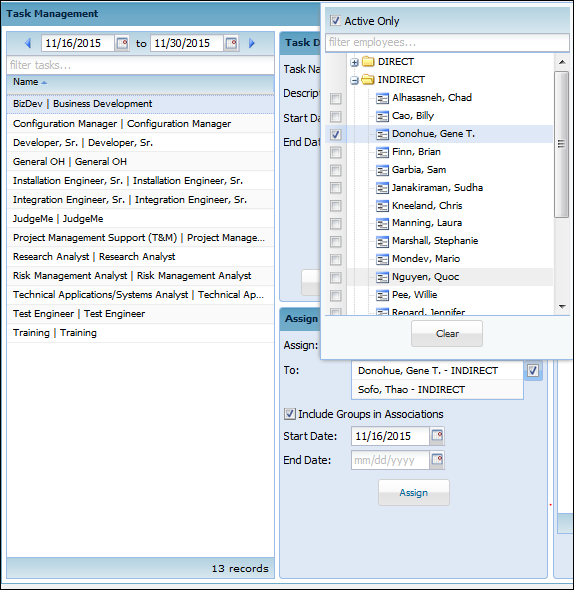
All of your currently active tasks will be listed on the left hand side with the option to add new ones in the center console. The bottom middle portion will allow you to assign a selected task (by clicking on the list on the list) to employee(s).
If an employee needs to have access to that task no matter which group is selected:
Click the task on the left side and it will populate under “Assign Task to Employees”
In “Assign:” open groups or View All and select the employee(s)
Do not click the box “Include Groups in Associations”
Change the start and end dates as needed
Click “Assign”

If an employee needs to have access to that task dependent on which group is selected:
Click the task on the left side and it will populate under “Assign Task to Employees”
In “Assign:” open groups and select the employee(s)
**Click the box “Include Groups in Associations” \*\*You will notice the group name after the employee name\*\***
Change the start and end dates as needed
Click “Assign”
**Setup Tip:**
MULTIPLE tasks to ONE employee – Administrator \> Employee Management \> Task
ONE task to MULTIPLE employees – Accounting \> Task Management
Attachments [Group\_Tasks.docx](https://knowledge.teamkeeper.com/hubfs/KB/internal/Guides%20and%20Pieces/Group%20Task%20Association/attachments/Group_Tasks.docx?hsLang=en) [Task\_Associations.docx](https://knowledge.teamkeeper.com/hubfs/KB/internal/Guides%20and%20Pieces/Group%20Task%20Association/attachments/Task_Associations.docx?hsLang=en) "
- [Business Rule Management](https://knowledge.teamkeeper.com/business-rule-management?hsLang=en)
- [CLOCKS - ATS](https://knowledge.teamkeeper.com/clocks-ats?hsLang=en)
- [Configuration](https://knowledge.teamkeeper.com/configuration?hsLang=en)
- [Customer Sites](https://knowledge.teamkeeper.com/customer-sites?hsLang=en)
- [DCAA Compliance](https://knowledge.teamkeeper.com/dcaa-compliance?hsLang=en)
- [Employee Management](https://knowledge.teamkeeper.com/employee-management?hsLang=en)
- [Genus Clocks](https://knowledge.teamkeeper.com/genus-clocks?hsLang=en)
- [GMS Notes](https://knowledge.teamkeeper.com/gms-notes?hsLang=en)
- [Guides and Pieces](https://knowledge.teamkeeper.com/guides-and-pieces?hsLang=en)
- [Help Guides](https://knowledge.teamkeeper.com/help-guides?hsLang=en)
- [Imports Exports](https://knowledge.teamkeeper.com/imports-exports?hsLang=en)
- [Leave](https://knowledge.teamkeeper.com/leave?hsLang=en)
- [Login](https://knowledge.teamkeeper.com/login?hsLang=en)
- [MFA - Multi Factor Authentication](https://knowledge.teamkeeper.com/mfa-multi-factor-authentication?hsLang=en)
- [Mobile App](https://knowledge.teamkeeper.com/mobile-app?hsLang=en#main-content)
- [Android](https://knowledge.teamkeeper.com/mobile-app?hsLang=en#android)
- [Notifications](https://knowledge.teamkeeper.com/notifications?hsLang=en)
- [Prepopulation](https://knowledge.teamkeeper.com/prepopulation?hsLang=en)
- [QuickBooks Knowledge](https://knowledge.teamkeeper.com/quickbooks-knowledge?hsLang=en)
- [QuickBooks](https://knowledge.teamkeeper.com/quickbooks?hsLang=en)
- [Questions / Inquiries](https://knowledge.teamkeeper.com/questions-inquiries?hsLang=en)
- [Reports](https://knowledge.teamkeeper.com/reports?hsLang=en)
- [Task Management](https://knowledge.teamkeeper.com/task-management?hsLang=en)
- [TeamKeeper Components](https://knowledge.teamkeeper.com/teamkeeper-components?hsLang=en)
- [TeamKeeper End User](https://knowledge.teamkeeper.com/teamkeeper-end-user?hsLang=en#main-content)
- [W2](https://knowledge.teamkeeper.com/teamkeeper-end-user?hsLang=en#w2)
- [Training Employee Guides](https://knowledge.teamkeeper.com/training-employee-guides?hsLang=en)
- [User Guides](https://knowledge.teamkeeper.com/user-guides?hsLang=en)
- [W2 Forms](https://knowledge.teamkeeper.com/w2-forms?hsLang=en)
- [Timesheet Data Backup Options](https://knowledge.teamkeeper.com/timesheet-data-backup-options?hsLang=en)
- [Version Release Notes](https://knowledge.teamkeeper.com/version-release-notes?hsLang=en)
# TeamKeeper
[mailto:email@email.com](mailto:email@email.com)
Copyright © 2026, TeamKeeper