---
title: QBO Starter Guide
description: When you first log in go to QuickBooks > QuickBooks Sync First thing you will want to do is click the “Connect to QuickBooks” link on the right side In the popup box, enter your credentials and
---
[Skip to content](https://knowledge.teamkeeper.com/kb/article/561#main-content)
English
Show submenu for translations
/teamkeepr_logo.png?width=191&height=45&name=teamkeepr_logo.png)
Open main navigation
Close main navigation
- English
Show submenu for translations
- Contact us
Contact us
How can we help you?
- There are no suggestions because the search field is empty.
1. [Help Center](https://knowledge.teamkeeper.com/?hsLang=en)
2. [QuickBooks Knowledge](https://knowledge.teamkeeper.com/quickbooks-knowledge?hsLang=en)
# QBO Starter Guide
When you first log in go to QuickBooks \> QuickBooks Sync
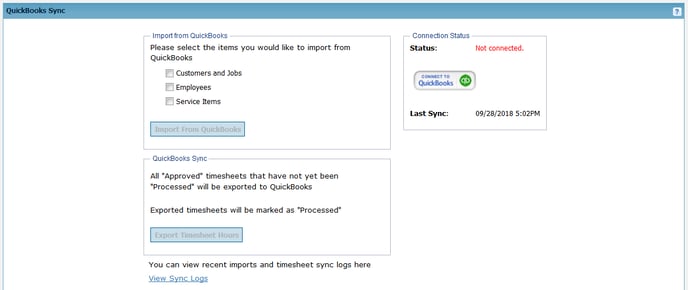
First thing you will want to do is click the “Connect to QuickBooks” link on the right side
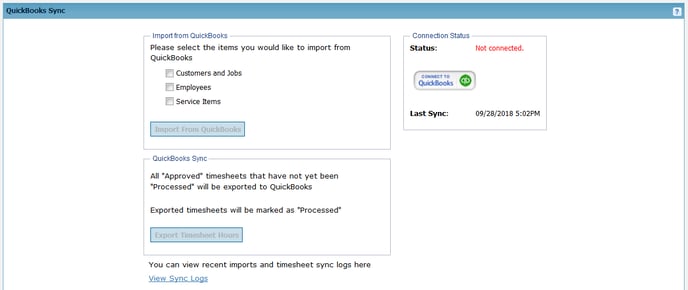
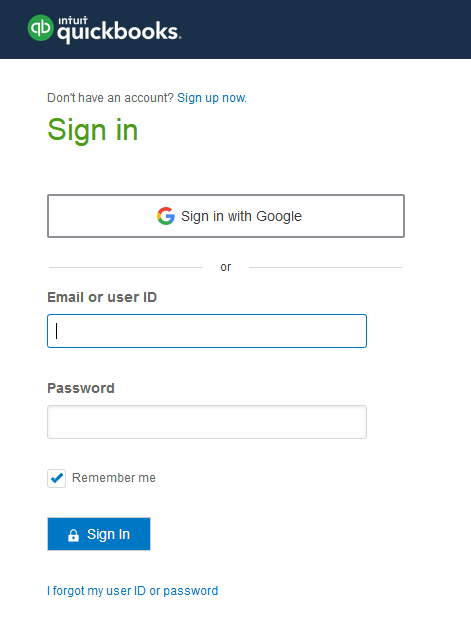
In the popup box, enter your credentials and click “Sign In”
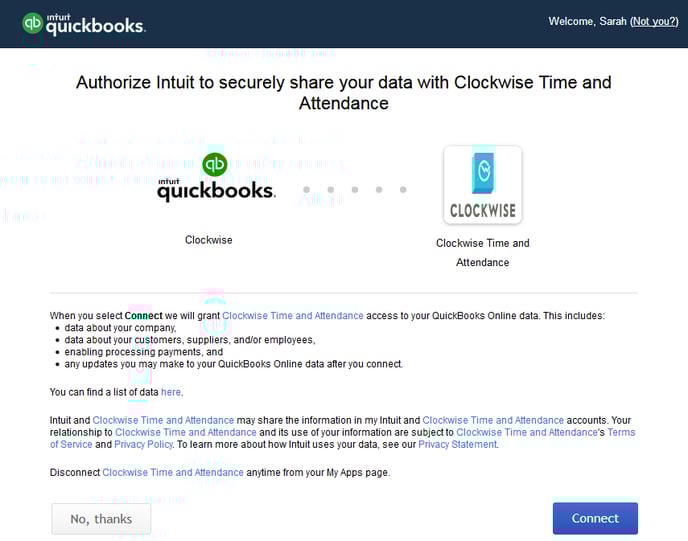
Before connecting to your account, you will be asked to confirm (*This is an outdated image logo should say Teamkeeper not Clockwise*)
Once you are connected, a confirmation message will appear at the top of the page
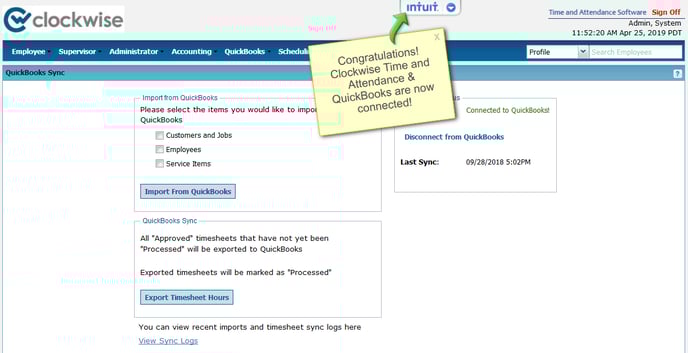
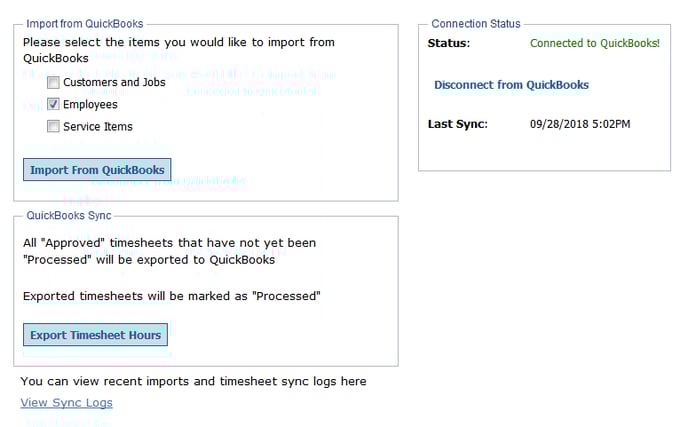
Now you are ready to sync items from QuickBooks to TeamKeeper. Click the box next to one or more items to import from QuickBooks.
After importing items to TeamKeeper, you will be taken to the Sync Log to view any additions.
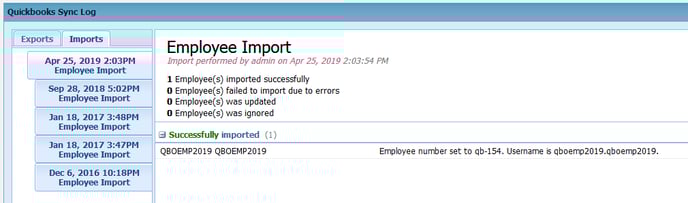
Usernames are firstname.lastname but there is no password assigned. You will need to go to Administrator \> Employee Management. Locate the employee that was just created by expanding the View All group or typing the employee’s name in the filter box.
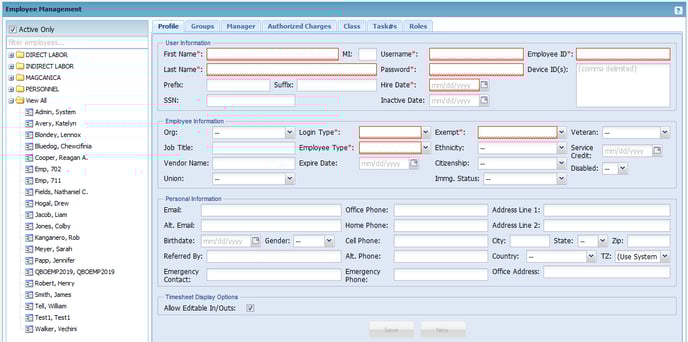
Click the employee’s name on the left side and enter a password
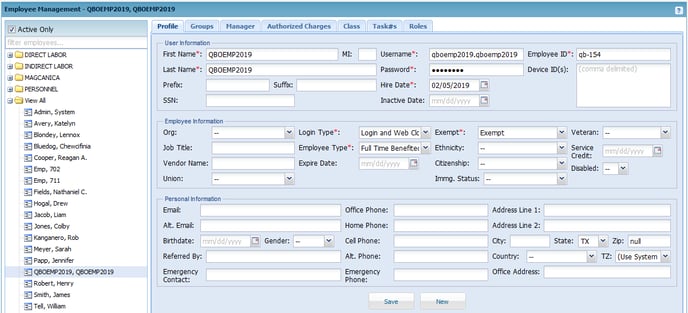
To view synced data go to –
Employees: Administrator \> Employee Management
Customers: Accounting \> Charge Code Management
Service Items: Accounting \> Task Management
"
- [Business Rule Management](https://knowledge.teamkeeper.com/business-rule-management?hsLang=en)
- [CLOCKS - ATS](https://knowledge.teamkeeper.com/clocks-ats?hsLang=en)
- [Configuration](https://knowledge.teamkeeper.com/configuration?hsLang=en)
- [Customer Sites](https://knowledge.teamkeeper.com/customer-sites?hsLang=en)
- [DCAA Compliance](https://knowledge.teamkeeper.com/dcaa-compliance?hsLang=en)
- [Employee Management](https://knowledge.teamkeeper.com/employee-management?hsLang=en)
- [Genus Clocks](https://knowledge.teamkeeper.com/genus-clocks?hsLang=en)
- [GMS Notes](https://knowledge.teamkeeper.com/gms-notes?hsLang=en)
- [Guides and Pieces](https://knowledge.teamkeeper.com/guides-and-pieces?hsLang=en)
- [Help Guides](https://knowledge.teamkeeper.com/help-guides?hsLang=en)
- [Imports Exports](https://knowledge.teamkeeper.com/imports-exports?hsLang=en)
- [Leave](https://knowledge.teamkeeper.com/leave?hsLang=en)
- [Login](https://knowledge.teamkeeper.com/login?hsLang=en)
- [MFA - Multi Factor Authentication](https://knowledge.teamkeeper.com/mfa-multi-factor-authentication?hsLang=en)
- [Mobile App](https://knowledge.teamkeeper.com/mobile-app?hsLang=en#main-content)
- [Android](https://knowledge.teamkeeper.com/mobile-app?hsLang=en#android)
- [Notifications](https://knowledge.teamkeeper.com/notifications?hsLang=en)
- [Prepopulation](https://knowledge.teamkeeper.com/prepopulation?hsLang=en)
- [QuickBooks Knowledge](https://knowledge.teamkeeper.com/quickbooks-knowledge?hsLang=en)
- [QuickBooks](https://knowledge.teamkeeper.com/quickbooks?hsLang=en)
- [Questions / Inquiries](https://knowledge.teamkeeper.com/questions-inquiries?hsLang=en)
- [Reports](https://knowledge.teamkeeper.com/reports?hsLang=en)
- [Task Management](https://knowledge.teamkeeper.com/task-management?hsLang=en)
- [TeamKeeper Components](https://knowledge.teamkeeper.com/teamkeeper-components?hsLang=en)
- [TeamKeeper End User](https://knowledge.teamkeeper.com/teamkeeper-end-user?hsLang=en#main-content)
- [W2](https://knowledge.teamkeeper.com/teamkeeper-end-user?hsLang=en#w2)
- [Training Employee Guides](https://knowledge.teamkeeper.com/training-employee-guides?hsLang=en)
- [User Guides](https://knowledge.teamkeeper.com/user-guides?hsLang=en)
- [W2 Forms](https://knowledge.teamkeeper.com/w2-forms?hsLang=en)
- [Timesheet Data Backup Options](https://knowledge.teamkeeper.com/timesheet-data-backup-options?hsLang=en)
- [Version Release Notes](https://knowledge.teamkeeper.com/version-release-notes?hsLang=en)
# TeamKeeper
[mailto:email@email.com](mailto:email@email.com)
Copyright © 2026, TeamKeeper